
 (210) 510-9193
In October 2026, we checked phone links on 20 selected contractor websites serving San Antonio. We could compare the number printed on 53 links with the number each link asked a phone to dial. Two links, on two different sites, showed one number and pointed to another. We didn’t place calls, so we can’t say where either number rang or whether anyone missed an inquiry. See the study results and how we counted the links.
Compare the page with your phone
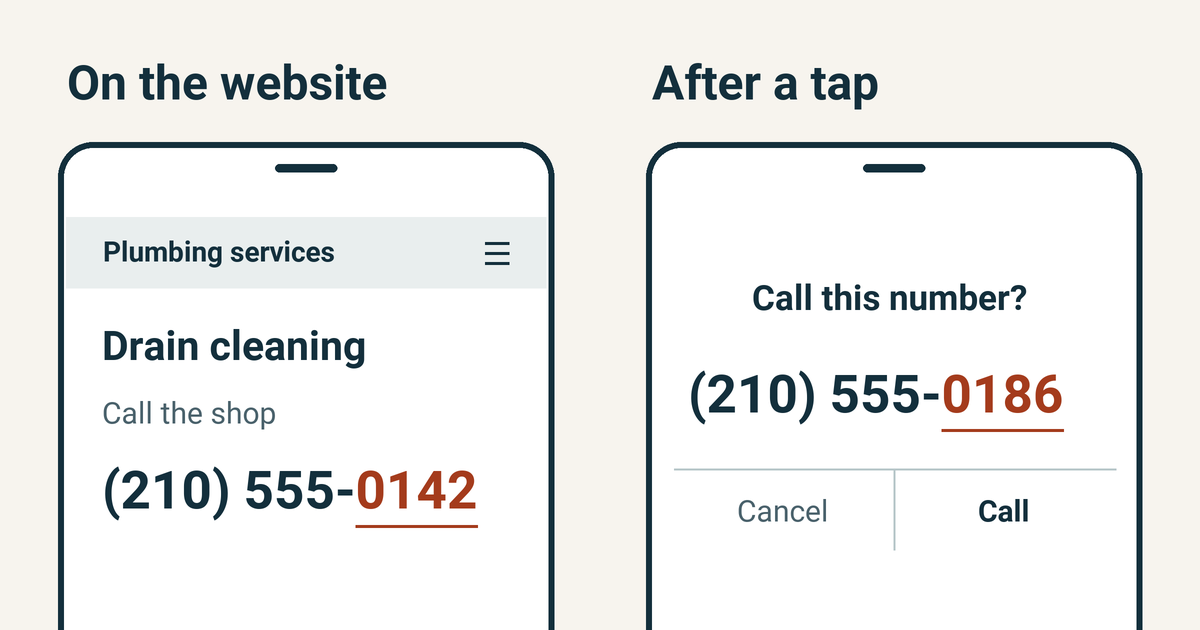
Imagine you run a plumbing shop. On your drain-cleaning page, customers see (210) 555-0142. Tap it and your phone offers to dial (210) 555-0186. A customer could reach you either way if both numbers ring your shop. The person who can settle that is the one who manages your phone lines.
Try it on your own site. Pick a page customers use to ask for an estimate. Write down the number you see. If your phone starts calls immediately, arrange a test with your office first. Otherwise, tap the link, read the number your phone offers to call and cancel. If the button just says “Call,” compare the number it opens with the one your office expects customers to reach.
Ask your office about the second number
Suppose your office manager recognizes the number ending in 0142 as the shop line. The number ending in 0186 might belong to a provider that tracks calls from your website and forwards them to the same desk. Ask the provider which number is assigned to that page and where it forwards. If the provider confirms the setup is intentional, keep the link and record what each number does.
Now suppose the office manager recognizes 0186 as the old answering service. Once the shop confirms the intended destination, give your web designer the page address, the exact link and both numbers. “On the drain-cleaning page, the number under ‘Call the shop’ ends in 0142. Tapping it opens 0186. Please point that link to our current shop line ending in 0142.” That’s enough to find and fix the right link even if the header already works.
Check that the right desk answers
Arrange one test call with the person who handles estimates. Open the service page again on your phone and tap the same link. Ask who received the call. If the numbers matched on screen but the call went to an old voicemail, give that result to whoever manages the phone routing.
If the page also offers a quote form, check that separately. A phone call won’t tell you whether a request reaches the inbox. Use the study’s checklist to check the rest of your contact options.